

Learn how to use n8n for workflow automation - from installation to building your first working integration.
What is n8n?
Ever find yourself doing the same repetitive tasks over and over? Copy data from one app to another, send notifications when something happens, update spreadsheets manually? Yeah, me too. That’s where n8n comes in.
n8n is basically like having a personal assistant that connects all your tools together. It’s a workflow automation tool, but here’s what makes it different from competitors like Zapier or Make:
- Fair-code licensed - You can actually see the source code and self-host it for free
- Visual workflow builder - Drag and drop, no coding required (but you can code if you want)
- 500+ integrations - Slack, GitHub, Google Sheets, Notion, databases, you name it
- AI-ready - Built-in nodes for OpenAI, Anthropic, and other AI services
- Self-hosted or cloud - Run it on your own server or use their hosted version
- Debugging built-in - Re-run workflows, inspect data at each step, actually see what’s happening
The best part? It’s designed for developers but accessible for everyone.
Installation & Running n8n
Getting n8n up and running is surprisingly easy. You’ve got two main options:
Option 1: Using Docker (Recommended)
If you have Docker installed, this is the quickest way to get started:
docker run -it --rm \
  --name n8n \
  -p 5678:5678 \
  -v ~/.n8n:/home/node/.n8n \
  n8nio/n8n
What this does:
- Spins up n8n in a Docker container
- Makes it available at
http://localhost:5678 - Saves your workflows in
~/.n8n(so they don’t disappear when you restart)
Option 2: Using npm (Simple but Less Isolated)
If you prefer npm:
npm install -g n8n
n8n start
That’s it. n8n is now running on http://localhost:5678.
Open your browser, create an account (stored locally), and you’re ready to build your first workflow.
Your First Workflow: Webhook to Slack
Let’s build something actually useful. We’ll create a workflow that:
- Listens for incoming HTTP requests (webhook)
- Sends whatever we receive to a Slack channel
This is super practical - you could use it to get notifications from GitHub, monitoring alerts, form submissions, whatever.
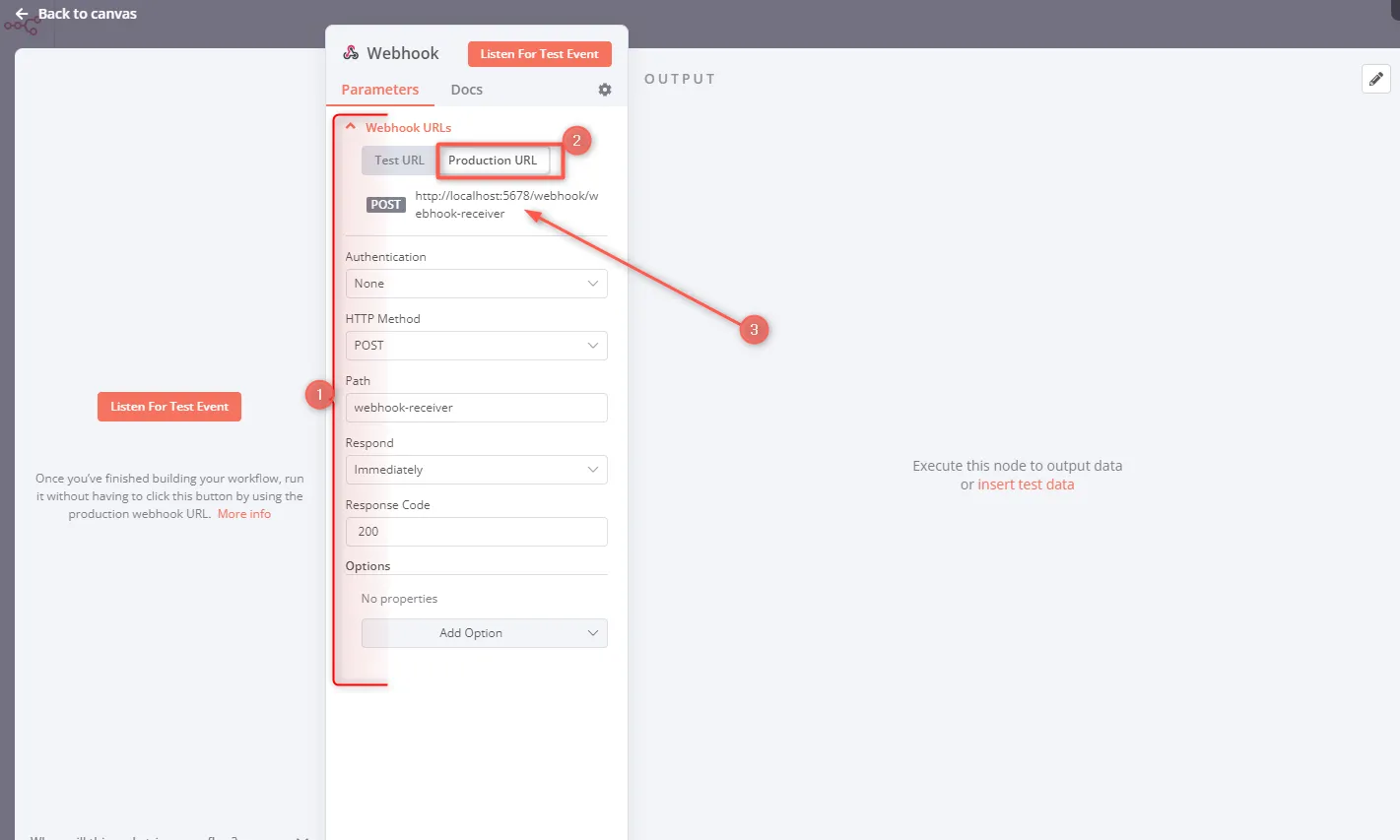
Step 1: Create a Webhook Node
In n8n’s workflow editor:
- Click the + button to add a node
- Search for “Webhook” and add it
- Set HTTP Method to
POST - Copy the Webhook URL - you’ll need this later
The webhook URL looks something like: http://localhost:5678/webhook/abc123
Step 2: Add a Slack Node
Now for the fun part - actually sending messages to Slack:
- Add another node and search for “Slack”
- Choose the “Send Message” action
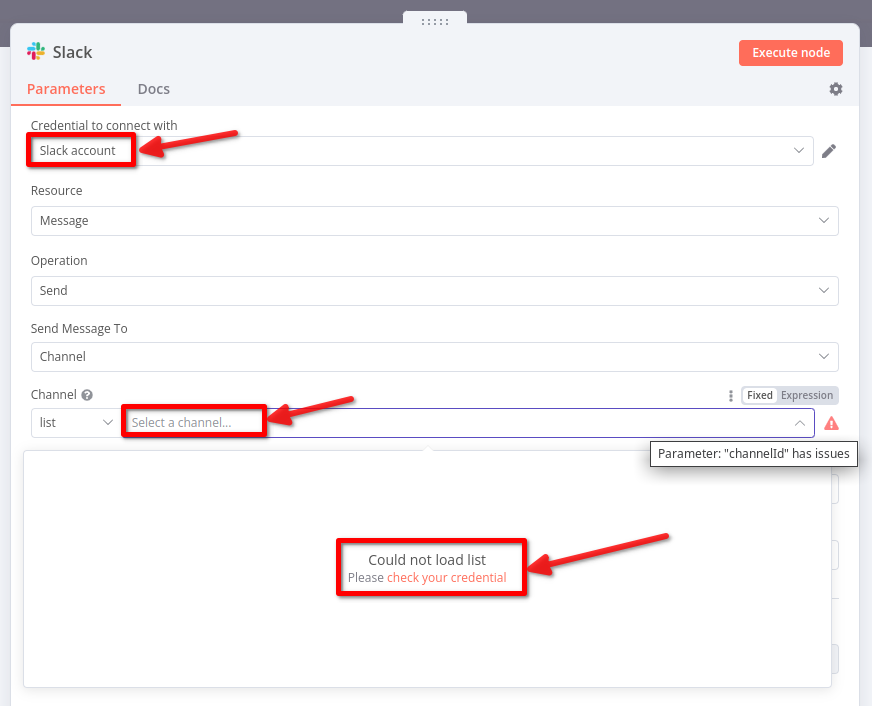
- Connect your Slack account (n8n will walk you through OAuth)
- Select your Channel (create a test channel if you want)
- Set the Message - you can use data from the webhook here
Pro tip: Use {{ $json.text }} to grab the “text” field from the webhook data. n8n’s expression syntax is super handy once you get used to it.
Step 3: Connect Everything
- Drag a connection line from the Webhook node to the Slack node
- Click Save in the top right
- Enable the workflow by toggling the switch to “Active”
Your workflow is now live and listening for requests!
Step 4: Test It Out
Time to see if it works. Open your terminal and send a test request:
curl -X POST -H "Content-Type: application/json" \
  -d '{"text": "Hello from n8n!"}' \
  http://localhost:5678/webhook/YOUR_WEBHOOK_PATH
Replace YOUR_WEBHOOK_PATH with the actual path from your webhook URL.
If everything’s set up correctly, you should see “Hello from n8n!” pop up in your Slack channel within a second or two.
Not working? Check n8n’s execution log (left sidebar) - it shows exactly what happened and where things might have gone wrong. This debugging feature is honestly one of the best parts of n8n.
Exporting & Sharing Workflows
One cool thing about n8n - you can export workflows as JSON and share them with others (or version control them with git).
Click the three dots menu → Download → Export Workflow
Here’s what our simple workflow looks like as JSON:
{
  "nodes": [
    { "name": "Webhook", "type": "Webhook", "parameters": {} },
    { "name": "Slack", "type": "Slack", "parameters": {} }
  ],
  "connections": { "Webhook": { "main": [{ "node": "Slack" }] } }
}
You can import workflows the same way - super handy for backing up your automation or sharing templates with your team.
What’s Next?
Congratulations! You just built your first n8n workflow. But this is just scratching the surface.
Here are some ideas to explore:
- GitHub to Slack - Get notified when someone opens a PR
- Google Sheets to Database - Sync spreadsheet data automatically
- AI Processing - Use OpenAI to analyze incoming data before saving it
- Error Handling - Add error catching and retry logic
- Scheduling - Run workflows on a schedule (daily reports, backups, etc.)
The n8n community has tons of workflow templates you can import and customize. It’s a great way to learn.
Useful Resources
- n8n Documentation - Comprehensive and well-written
- n8n Community Forum - Active community, helpful folks
- Slack API Docs - If you want to go deeper with Slack integrations
- n8n YouTube Channel - Video tutorials and use cases
Built something cool with n8n? I’d love to hear about it in the comments. Happy automating!
If you find this post helpful